Урок:

Unit 5. COMMUNICATION TECHNOLOGIES. Інтернет-кафе.

Опис уроку (учням цей опис не показується):

Unit 5. COMMUNICATION TECHNOLOGIES

Тема: Інтернет-кафе.

Мета: -практична: організувати роботу з оперування лексико-граматичним матеріалом з теми на рівні монологічного та діалогічного висловлювань; формувати вміння сприймати спеціальну термінологію на слух; організувати роботу з читання й перевірити вміння учнів одержувати інформацію з тексту, пе­ревірити ступінь сформованості перцептивних здібностей учнів; вчити уч­нів в умінні логічно й послідовно викладати свої думки;

розвивальна: роз­вивати оперативну і довгострокову пам'ять, уміння планувати свій мо­вленнєвий учинок на рівні міні-мо­нологу, міні-діалогу (реакція на за­питання); розвивати техніку читання, креативне мислення, творчий підхід до вико­нання завдань та культуру мови;

виховна: фор­мувати соціолінгвістичну компетенцію, виховувати інформаційну культуру та свідоме й відповідальне став­лення до користування Інтернетом.

Обладнання уроку: підручник, зошит, Mind map, тести, картки із завданнями, медіапрезентація.

Вміст уроку:
1
2
3
4
5

Урок не містить жодного завдання. Додайте завдання.

Щоб додати завдання, оберіть категорію завдання на панелі запитань.

1

  1. Warm-up

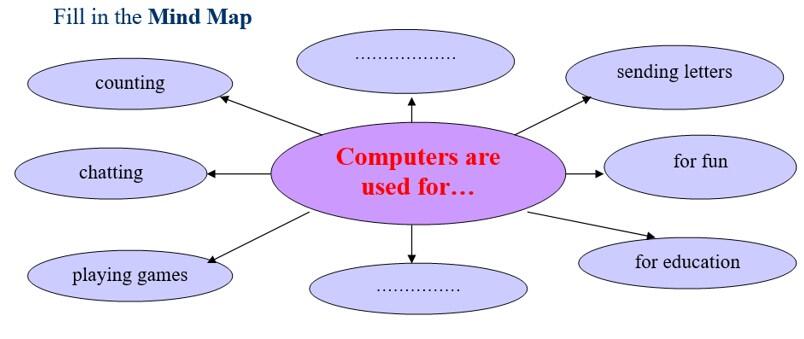
As always as usual before we start our lesson let’s try to remember and repeat our new words and expressions. Today we don’t read our poems and tongue-twisters. You know that computers can do a lot of work for us. They keep useful information. They help us at school. Besides, they can even teach us English as well as other subjects. And what do you think about the role of computers in your life? That’s why, please, complete the sentence: Computers are used for…

2

Unit 5. COMMUNICATION TECHNOLOGIES Тема: Інтернет-кафе.
22 лютого 2023
0 0
Аватар профіля Ляхова Дарина Вадимівна
Англійська мова
10 клас
4 5 0 1 19 0

3

  1. Робота з лексикою

  1. Ex.1

  • Read the definitions of the phrases in bold. Complete each sentence (1-3) with the appropriate phrase by changing the form of the verb in it.

download a file — to take a file from    another location, e.g. a web server, 

  and save it on a computer      

upload a file — to transfer a file from 

  a computer to another location, e.g. 

  a web server

post a message — to place a message on a bulletin board, or sent it to a     

 newsgroup

1  You can publish your  web   

 pages by ... them to the web 

  server.

2   If you want to find out  more 

     about phrasal verbs, you         

     should ... to  the alt.usage.   

     English newsgroup.

3   You can ... the software from 

       our website.

  1. Ex.2 (a)

  • Match phrasal verbs with their definitions.

switch/turn on something

  • switch/turn off something

  • plug in something

  • turn up something

  • charge something up

    a   connect to an electricity supply

b    make louder or stronger

c    touch a switch to make a   

     machine or electrical device   

     start working

d   put electricity into a piece of 

    equipment

e    touch a switch to make an 

    electrical device stop working

2. Ex. 2(b)

  • Complete the sentences with the correct tense forms of the appropriate phrasal verbs from (a).

  1. My mobile phone isn't working — I need to ... it... .

  2. Would the last person to leave the room, please, ... the lights.

  3. When I tried to ... my computer in the morning, nothing happened.

  4. Can you ... the TV? I can hardly hear what the actors are saying. .   

  5.  The computer isn't working because you haven't... it...!

  1. Ex. 3

  • Match to make word combinations. Use them to compose your own sentences.

  1. - current                                       -screen

  2. - World Wide                              - the net

  3. - email                                         - events

  4. - surfing                                       - information

  5. - download                                   - sites

  6. - web                                            - Web

  7. - computer                                    - message   

4

  1. Читання

  1. Read a piece of information from an Internet page about the internet cafe history and answer the questions:

  1. When and where did these cafes started?

  2. How did they evolve in that time?

An Internet cafe or cybercafe is a place which provides internet access to the public, usually for a fee. These businesses usually provide snacks and drinks, hence the cafe in the name. The fee for using a computer is usually charged as a time-based rate.

The online cafe phenomenon was started in July 1991 by Wayne Gregori in San Francisco when he began SFnet Coffeehouse Network. Gregori designed, built and installed 25 coin operated computer terminals in cof­feehouses throughout the San Francisco Bay Area. The cafe terminals di­aled into a 32 line Bulletin Board System that offered an array of electronic services including FIDOnet mail and, in 1992, Internet mail.

The concept of a cafe with full Internet access (and the name Cybercafe) was invented in early 1994 by Ivan Pope. Commissioned to develop an Inter­net event for an arts weekend at the Institute of Contemporary Arts (ICA) in London, and inspired by the SFnet terminal based cafes, Pope wrote a proposal outlining the concept of a cafe with Internet access from the ta­bles. The event was run over the weekend of 12-13 March 1994 during the 'Towards the Aesthetics of the Future' event.

In June 1994, The Binary Cafe, Canada's first Internet cafe, opened in Toronto, Ontario.

After an initial appearance at the conference site of the 5th Interna­tional Symposium on Electronic Art, ISEA, in August 1994, an establish­ment called CompuCafe was established in Helsinki, Finland, featuring both Internet access and a robotic beer seller.

Inspired partly by the ICA event, a commercial establishment of this type, called Cyberia, opened on September 1, 1994 in London, England.

The first public, commercial American Internet cafe was conceived and opened by Jeff Anderson in August 1994, at Infomart in Dallas, Texas and was called The High Tech Cafe.

Next, in the USA, three Internet cafes opened in the EastVillage neigh­borhood of New York City: Internet Cafetm, opened by Arthur Perley, the @ Cafe, and the Heroic Sandwich.

A variation of Internet cafe called PC bang (similar to LAN gaming center) became extremely popular in South Korea when StarCraft was re­leased in 1997. Although computer and broadband penetration per capita were very high, young people went to PC bangs to play multiplayer games.

5

V.      Підсумки уроку      

- Put the following computer operation in the correct order.

Write down them into your copy-books and underline Phrasal Verbs.

Work

B  Close the application

C  Open the application

Print your work

Save you work on the hard disk

Switch off the computer, the monitor and the printer

Switch on the computer, the monitor and the printer

V. Домашнє завдання

Write down 10 sentences about Internet café.

Рефлексія від 0 учнів

Сподобався:

0

Так: 0

Ні: 0

Зрозумілий:

0

Так: 0

Ні: 0

Потрібні роз'яснення:

0

Ні: 0

Так: 0

Рекомендуємо

Prepare 5 НУШ. Unit 5. Lesson 1

Prepare 5 НУШ. Unit 5. Lesson 1

670

Аватар профіля Каргіна Олександра Володимирівна
Англійська мова
5 клас

33 грн

Prepare 5 НУШ. Unit 5. Lesson 3

Prepare 5 НУШ. Unit 5. Lesson 3

547

Аватар профіля Каргіна Олександра Володимирівна
Англійська мова
5 клас

20 грн

Інтернет речей. Інтернет-маркетинг та інтернет-банкінг.

Інтернет речей. Інтернет-маркетинг та інтернет-банкінг.

566

Аватар профіля Самоліч Ігор Володимирович
Інформатика
8—11 клас

25 грн

"ІНТЕРНЕТ"

"ІНТЕРНЕТ"

484

Аватар профіля Тунік Світлана Григорівна
Мистецтво
7 клас

46 грн

Безпечне використання інтернету. Спілкування в інтернеті

Безпечне використання інтернету. Спілкування в інтернеті

217

Аватар профіля Балюк-Дмітрієва Олена Миколаївна
Інформатика
5 клас

31 грн

Інтернет для навчання

Інтернет для навчання

171

Аватар профіля Баран Світлана Юріївна
Інформатика
5 клас

20 грн

Схожі уроки

04.02.Скоро свято. Введення ігрових моментів. Вивчення та написання літери Mm.

04.02.Скоро свято. Введення ігрових моментів. Вивчення та написання літери Mm.

536

Аватар профіля Поринець Євгенія Іванівна
Англійська мова
1 клас

Inventions and lifestyle

Inventions and lifestyle

851

Аватар профіля Тетяна Володимирівна
Англійська мова
11 клас

art

art

821

Аватар профіля Дмитриєнко Ірина Володимирівна
Англійська мова
3—6 років, 1—12 клас та дорослі

Час історій

Час історій

361

Аватар профіля Ніколенко Марина Олександрівна
Англійська мова
3 клас

Pure science

Pure science

356

Аватар профіля Панасенко Лариса Олегівна
Англійська мова
9 клас

Домашні улюбленці. Вивчення літери Ll

Домашні улюбленці. Вивчення літери Ll

194

Аватар профіля Сивуля Маріанна Василівна
Англійська мова
1 клас